Better Trigger Condition Editing
-
Trigger condition editing for Tasks in AppColl is in dramatic need of improvement--there is no ability to insert new triggers in between existing triggers, or to change which "when" clause a given "while" condition is "anded" with.
This makes defining new tasks or modifying existing ones extremely tedious. For example, if you have a task with multiple different trigger scenarios, each with its own WHEN clause that each have their own WHILE clauses, you might easily have 10-12 separate trigger conditions, e.g., 3 WHEN clauses, each with its own set of 3 WHILE clauses. If you realize that you need to tweak the triggering by adding another WHILE clause to the last WHEN clause, no big deal--just tack it on and you're done. But if you need to do it to the first-listed WHEN clause, you're out of luck--you have to delete the second and third WHEN clauses and all their WHILE clauses, add the new WHILE clause to the first WHEN clause, and then re-construct the second and third WHEN clauses and all their WHILE clauses. In the example above, you'd have to delete 8 of your 12 trigger clauses, add the additional trigger clause, and then re-build the deleted clauses.
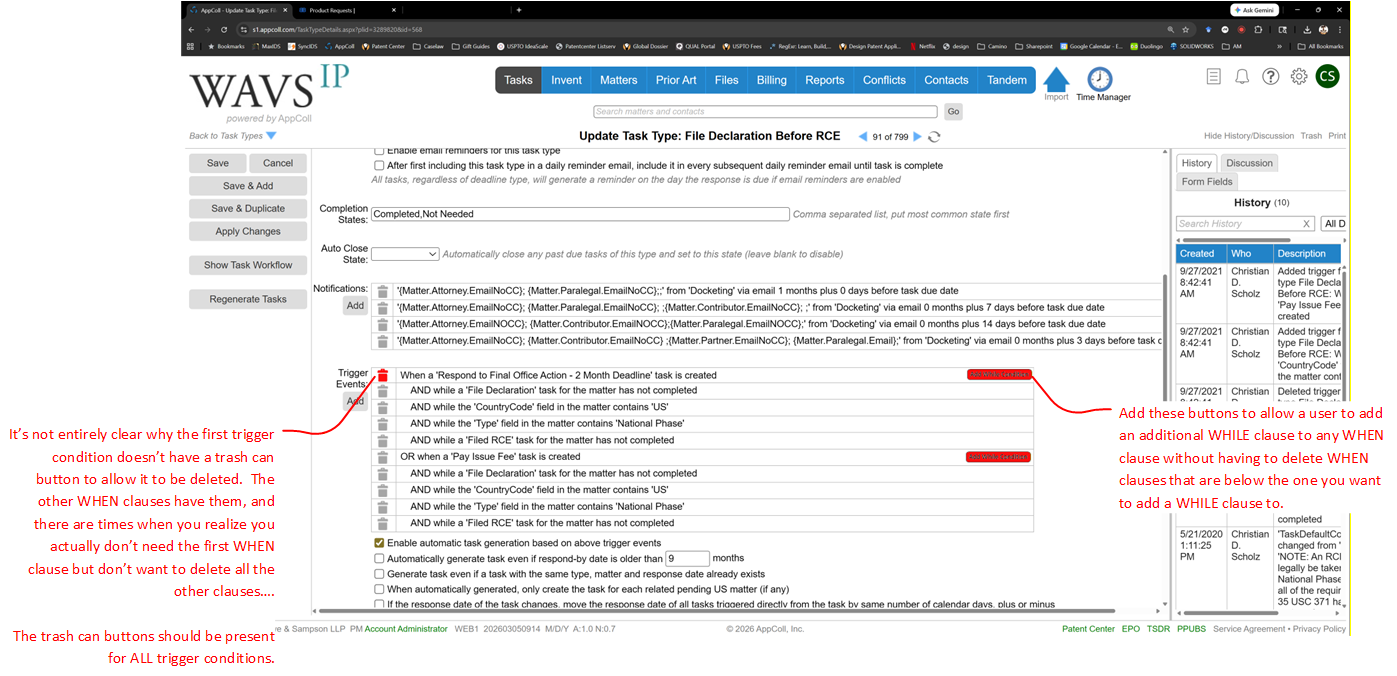
Suggestion: The trigger conditions for a TaskType are currently listed in a table format, with the WHILE conditions indented in rows below their parent WHEN condition. Just add a button to each WHEN condition row in the table that would, when the user clicks it, allow the user to insert a new WHILE condition for that WHEN condition. The newly added WHILE clause would be added after the existing WHILE clauses for the relevant WHEN clause. This would entirely solve the significant usability issue noted above.
Icing on the Cake Suggestions: Maybe also add up/down buttons to allow the order of trigger conditions to be changed. This would be more of a cosmetic change, as changing the order of WHILE clauses within a WHEN clause would have no functional impact--but it would allow users to re-organize the WHILE conditions within a WHEN condition so that they are more consistent between WHEN conditions for a given TaskType. And it would allow a WHILE condition to be moved up or down into an adjacent WHEN condition, which would affect function but also potentially be useful if you put a WHILE condition in the wrong WHEN condition and want to relocate it.
Finally, the UI already has the ability to individually delete any condition--except the first WHEN condition. It really should allow the user to delete that one as well. There are times when you define a set of task triggers to have multiple WHEN conditions, and then later you realize that the first one isn't needed any more. But you can't delete it without deleting all trigger events and then rebuilding the ones you want to keep. Or by changing the first WHEN condition to be the last WHEN condition and updating its WHILE conditions to match (only works if first WHEN has same or greater number of WHILE conditions as last WHEN condition or if you only have two WHEN conditions).
Screenshot below showing suggested revisions to TastType definition UI.
-
Thanks, Christian!
-
I noticed today that there is now a small "add" button for each When group in a trigger set that allows a While condition to be inserted at that When group level without disturbing lower When groups!
A nice start!
-
We added a formal request to allow for assigning While statements to specific When statements. We'll make an announcement when this has been implemented.
-
@SadiqA2304 1000% agree. One thing that would also be a huge value add would be some way to select a limited set of matters to use as "test" cases (this would be in the TaskType definition UI) and then provide a "test" button for each WHEN clause that would let you, in effect, simulate what the outcome would be, i.e., WHEN clause executes or fails, for that WHEN clause for each of the specified matters. It would be a much quicker way of testing whether you've got your WHILE clauses for a given WHEN clause set up right. Right now, you often have to have a test matter open in Matter Details, manually add a triggering task for a WHEN clause, and then see what happens, then delete those triggered tasks for next round of testing, etc. It's rather time-consuming.
-
+100. Trigger-based automation is the killer feature of Appcoll for me, but the way it's implemented needs an overhaul. We need to be able to edit these things much more easily.