AppColl Logo
    • Register
    • Login
    • Search
    • Recent
    • Tags
    • Popular
    • Groups
    1. Home
    2. ChristianS2558
    3. Posts
    • Profile
    • Following 0
    • Followers 0
    • Topics 65
    • Posts 129
    • Best 77
    • Controversial 0
    • Groups 0

    Posts made by ChristianS2558

    • Better Form Field Syntax

      This relates to earlier posts I made: (https://forum.appcoll.com/topic/137/new-field-syntax-list?_=1773350339170) and https://forum.appcoll.com/topic/169/more-streamlined-form-letter-field-syntax?_=1773350545712

      Having just had to update our Inventor/Applicant sheet, which is 9600 characters long and, in essence, just lists the first, last, and middle name, citizenship, address, and foreign nickname for the first 20 inventors, I thought it worth re-elevating this request. I wanted to add, for each inventor, their TaxID number (if they have one listed). It is a painful document to edit. Here's what it looks like in raw form for the first 3 inventors:

      {MATTER.INVENTOR1.LAST}{+032MATTER.INVENTOR1.SUFFIX}{+044+032Matter.Inventor1.First}{+032Matter.Inventor1.Middle}{+044+032+067+105+116+105+122+101+110+115+104+105+112+058+032Matter.Inventor1.CitizenshipFull}{+013+010+067+104+105+110+101+115+101+032+067+104+097+114+097+099+116+101+114+032+078+097+109+101+058+032Matter.Inventor1.ForeignNickname}{+013+010Matter.Inventor1.Address}{+013+010MATTER.INVENTOR2.LAST}{+032MATTER.INVENTOR2.SUFFIX}{+044+032Matter.Inventor2.First}{+032Matter.Inventor2.Middle}{+044+032+067+105+116+105+122+101+110+115+104+105+112+058+032Matter.Inventor2.CitizenshipFull}{+013+010+067+104+105+110+101+115+101+032+067+104+097+114+097+099+116+101+114+032+078+097+109+101+058+032Matter.Inventor2.ForeignNickname}{+013+010Matter.Inventor2.Address}{+013+010MATTER.INVENTOR3.LAST}{+032MATTER.INVENTOR3.SUFFIX}{+044+032Matter.Inventor3.First}{+032Matter.Inventor3.Middle}{+044+032+067+105+116+105+122+101+110+115+104+105+112+058+032Matter.Inventor3.CitizenshipFull}{+013+010+067+104+105+110+101+115+101+032+067+104+097+114+097+099+116+101+114+032+078+097+109+101+058+032Matter.Inventor3.ForeignNickname}{+013+010Matter.Inventor3.Address}

      The syntax for working with form fields leaves a lot to be desired. Things that would make it so much better/user-friendly include:

      a) Ability to specify, in plain English, what the preamble/postamble for a given field will be. This business of spelling out, character-by-character, what the preamble/postamble should be using a + symbol and the 3-digit ASCII code for each character makes it impossible look at a form letter template document and understand how the document will look once populated with data. It also dramatically shortens the "usable" MailTo link content that can be passed to an email from an email template. Allowing use of plain English, e.g., with delimiters, would address both issues.

      b) Ability to use "lists" in templates, e.g., if you have the same set of fields that you want to output for each member of a list, there should be a way to do that via a list field and one instance of the set of fields that you want to output, as opposed to having to specify the same set of fields 20 times with only an index number changing for each instance.

      Separately from the above, it appears that the Address form field inserts a double carriage return at the end of it, thereby forcing a blank new line after it. This causes issues when Address is used in a block of other field data, like in the above example--each field in the block of field data has a +013+010 preamble that causes that field to start on a new line if data is present. If the field has no data, however, the new line doesn't get inserted, thereby avoiding a blank line. The Address field, however, doesn't seem to play well with this convention--I had to list it last for each block since it seemed it was always introducing an unwanted gap line in between itself and an immediately following field line. If users want a gap line after the Address field, they do always have the option of specifying one in the field postamble, of course.

      Any chance that the above could be implemented?

      Cheers,
      Christian

      posted in Product Requests
      ChristianS2558
      ChristianS2558
    • RE: Better Trigger Condition Editing

      @SadiqA2304 1000% agree. One thing that would also be a huge value add would be some way to select a limited set of matters to use as "test" cases (this would be in the TaskType definition UI) and then provide a "test" button for each WHEN clause that would let you, in effect, simulate what the outcome would be, i.e., WHEN clause executes or fails, for that WHEN clause for each of the specified matters. It would be a much quicker way of testing whether you've got your WHILE clauses for a given WHEN clause set up right. Right now, you often have to have a test matter open in Matter Details, manually add a triggering task for a WHEN clause, and then see what happens, then delete those triggered tasks for next round of testing, etc. It's rather time-consuming.

      posted in Product Requests
      ChristianS2558
      ChristianS2558
    • Better Trigger Condition Editing

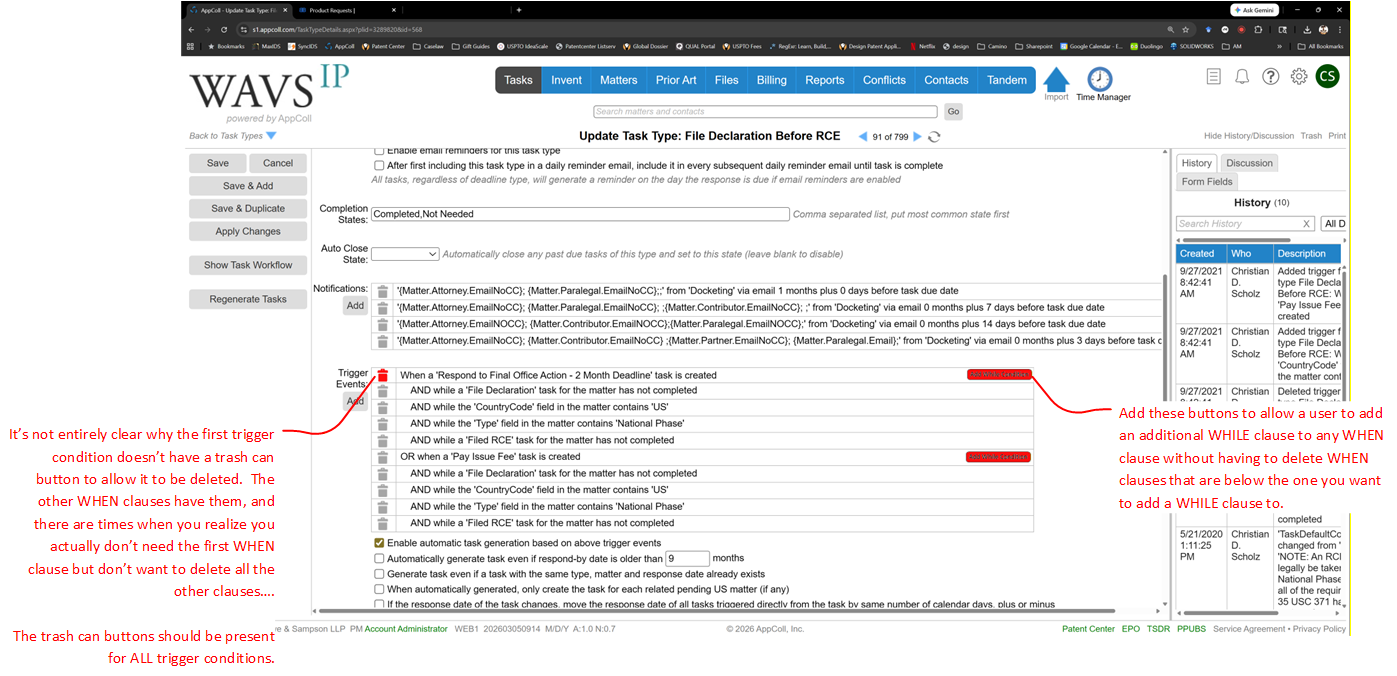
      Trigger condition editing for Tasks in AppColl is in dramatic need of improvement--there is no ability to insert new triggers in between existing triggers, or to change which "when" clause a given "while" condition is "anded" with.

      This makes defining new tasks or modifying existing ones extremely tedious. For example, if you have a task with multiple different trigger scenarios, each with its own WHEN clause that each have their own WHILE clauses, you might easily have 10-12 separate trigger conditions, e.g., 3 WHEN clauses, each with its own set of 3 WHILE clauses. If you realize that you need to tweak the triggering by adding another WHILE clause to the last WHEN clause, no big deal--just tack it on and you're done. But if you need to do it to the first-listed WHEN clause, you're out of luck--you have to delete the second and third WHEN clauses and all their WHILE clauses, add the new WHILE clause to the first WHEN clause, and then re-construct the second and third WHEN clauses and all their WHILE clauses. In the example above, you'd have to delete 8 of your 12 trigger clauses, add the additional trigger clause, and then re-build the deleted clauses.

      Suggestion: The trigger conditions for a TaskType are currently listed in a table format, with the WHILE conditions indented in rows below their parent WHEN condition. Just add a button to each WHEN condition row in the table that would, when the user clicks it, allow the user to insert a new WHILE condition for that WHEN condition. The newly added WHILE clause would be added after the existing WHILE clauses for the relevant WHEN clause. This would entirely solve the significant usability issue noted above.

      Icing on the Cake Suggestions: Maybe also add up/down buttons to allow the order of trigger conditions to be changed. This would be more of a cosmetic change, as changing the order of WHILE clauses within a WHEN clause would have no functional impact--but it would allow users to re-organize the WHILE conditions within a WHEN condition so that they are more consistent between WHEN conditions for a given TaskType. And it would allow a WHILE condition to be moved up or down into an adjacent WHEN condition, which would affect function but also potentially be useful if you put a WHILE condition in the wrong WHEN condition and want to relocate it.

      Finally, the UI already has the ability to individually delete any condition--except the first WHEN condition. It really should allow the user to delete that one as well. There are times when you define a set of task triggers to have multiple WHEN conditions, and then later you realize that the first one isn't needed any more. But you can't delete it without deleting all trigger events and then rebuilding the ones you want to keep. Or by changing the first WHEN condition to be the last WHEN condition and updating its WHILE conditions to match (only works if first WHEN has same or greater number of WHILE conditions as last WHEN condition or if you only have two WHEN conditions).

      Screenshot below showing suggested revisions to TastType definition UI.

      Trigger UI.png

      posted in Product Requests
      ChristianS2558
      ChristianS2558
    • How to docket rescind non-publication request tasks

      We've been using this for several years, and I figured I'd share. If you file a non-pub request in a US matter, there isn't a very easy way of auto-docketing a Task to rescind that non-pub request in response to later filing a foreign application. However, it's not impossible to do so....

      DISCLAIMER: This seems to work, but I make no warranties and, of course, do not accept liability if it turns out to not work as intended—you should test it yourself to satisfy yourself that it works before relying on it.

      You'll need to create the task types below.
      ................................................................................................................................................................................................................................................
      TaskType: Rescind Non-Pub Transient Trigger

      Deadline Type: Transient Event

      Response Date: Use the triggering task closed-on date with 0 months/0 days offset.

      Make sure that “Enable automatic task generation based on above trigger events” and “When automatically generated, only create the task for each related pending US matter (if any)” are both checked.

      Triggers
      a) When any task completes
      b) AND while the 'CountryCode' field in the matter doesn't contain 'US'
      c) AND while the 'TaskType' field in the task contains 'Statutory Bar Date'

      NOTE: (c) can be replaced with whatever task is appropriate for your docketing setup—the key is to choose a task that will always be present in a non-US or PCT filing and that will always be closed out as “Complete” when that non-US or PCT filing is actually filed and that will have a closed-on date that is the actual filing date of that non-US or PCT filing (this is important!). We used “statutory bar date” since we have both Paris and PCT statutory bar date tasks, and this approach allowed us to get both with one rule set. But you could also just use “when a specific task completes with a given state” to combine (a) and (c) if you just use one such task type for all foreign filings.
      ................................................................................................................................................................................................................................................

      TaskType: Rescind Non-Pub Request

      Deadline Type: Hard External Deadline with +45 days (or maybe less, if you want to have some cushion) from triggering task reference date as response date.

      Make sure that “Enable automatic task generation based on above trigger events” is checked.

      Triggers
      a) When a 'Rescind Non-Pub Transient Trigger' task is created
      b) AND while the 'NonPublication' field in the matter contains 'True'
      c) AND while the 'CountryCode' field in the matter contains 'US'
      d) AND while the 'Type' field in the matter contains 'Utility'
      e) AND while the 'Type' field in the matter doesn't contain 'Utility: Provisional'
      f) AND while a task database query 'Matter = "{Task.Matter}" and TaskType = "Rescind Non-Pub Request"' doesn't return any records

      Every time a foreign case gets filed, the transient trigger will be created (and then disappear) in all related US matters—the Rescind Non-Pub Request listens for that trigger event. If it hears it in a US matter, it then auto-dockets in that matter if the additional conditions are met.

      (a) is the trigger event. (b) limits the Rescind Non-Pub Request task to only docket in matters that have Non-Pub set to True. (c) limits this auto-docketing to US matters only (this is probably unnecessary—the trigger task should only be created in US matters in the first place). (d) limits the Rescind Non-Pub Request task to only docket in Utility apps (not design apps) and (e) excludes docketing it in provisionals (also probably unnecessary since they don’t publish/non-publish). Lastly, (f) prevents duplicate Rescind Non-Pub Request tasks from being created, e.g., one for each foreign app filed off of a US matter—you just get the first one to be docketed.

      NOTE: (f) is handy for reducing clutter, but using it runs the risk of having the date for the Rescind Non-Pub Request task be wrong. For example, if you file multiple foreign apps, and the first one that triggers the transient trigger happens to have a filing date (closed-on date) that is after the filing date (closed-on date) of a later-docketed foreign filing, the Rescind Non-Pub Request will have a due date based on the first-docketed but not first-filed foreign matter, and that will be off. If you prefer, leave (f) off to ensure that Rescind Non-Pub Requests are docketed for every foreign filing according to each such foreign filing’s actual filing date.

      Cheers,
      Christian

      posted in General Discussion
      ChristianS2558
      ChristianS2558
    • CarryForward Field & Tasks that can modify it

      There are situations where there it would be desirable to control triggering of a task based on events that happened in an earlier-filed case in the same family. For example, maybe you have a checklist that you want to have done when the first application in a family is filed, but you don't want to have it done for each subsequent application in the family.

      Right now, I don't believe there is a mechanism that lets you autodocket tasks to account for such a scenario.

      One way to add such capability would be to have a CarryForward field where the contents of the field are carried forward into the same field in subsequent matters that are based on that matter (using the "Save and Duplicate" function); this is already done for several fields when you use "Save and Duplicate," so this new field could simply be treated in the same way.

      However, Tasks Type definitions would be updated to have several new parameters that allow a Task to modify the data in the CarryForward field. At a minimum, that ability would be to allow the task, when "Completed," to append specified text to the contents of the CarryForward field for the matter. In the checklist scenario, when the checklist task is "Completed," the checklist task could be set up to append "Checklist" to the CarryForward field for the matter (I included asterisks to serve as delimiters). When the next matter in the family is opened, it would get the "Checklist" data in the CarryForward field, and that could then be used as a trigger to prevent creation of a checklist task in the new matter.

      If you wanted to give even more flexibility to this approach, the parameters that could be set in a Task could include:

      Append specified text (as described above)
      Remove specified text (delete specified text from field--this is where delimiters would be very prudent)
      Replace specified text with other specified text
      Clear entire field

      You could also have these options able to be specified for different task states, e.g., when task is created/opened, closed, or changed to a particular TaskStatus.

      Finally, it would be useful to have the ability for the specified text include form fields, e.g., "FiledOn( {Matter.FilingDate})" and for tasks to have the ability to have their RefDate or RespondBy dates set based on the date stored in such text in the CarryForward field. For example, in New Zealand, you have to request examination by 5 years from the filing date of the first NZ application (regardless of whether it is in that first NZ app or a DIV of it). You can't rely on priority date for the 5-year deadline since your first app might be a US provisional, and you can't rely on the NZ filing date since that wouldn't be the right one for DIV applications. Being able to pass on the relevant date to later applications would be a real help....

      posted in Product Requests
      ChristianS2558
      ChristianS2558
    • Custom user fields enhancements

      AppColl allows users to define up to 16 custom text fields and 4 custom date fields that are accessible via the Matters module. These fields have internal names in AppColl of UserString1, UserString2, UserDate1, UserDate2, etc.

      There are five things that would greatly improve these custom fields:

      a) Significantly expand the number of custom text and date fields available to users (or make it not capped at all). It is often the case that we use the custom fields to store client-specific data where there is no appropriate field available in the default field set. Ideally, we'd store the data in a custom field with the same name used by the client for that data so that there's no uncertainty as to which custom field has that data. However, with only 16 text fields to work with, we often have to use the same custom field to store different types of data for different clients. Expanding the number of custom fields would allow us to avoid having to make a custom field serve multiple different purposes for different clients.

      b) Related to (a), it would be nice if one could optionally specify one or more clients for each custom field; AppColl would then only show a custom field in the MatterDetails interface if it either a) had no client specified (i.e., generic to all clients) or b) had a client specified that matched the client of the matter being displayed.

      c) Also related to (a), in the column picker for Matters/Tasks, it would probably be a good idea to either put custom fields as a separate tab or allow the user to include/exclude them from the list of fields/columns. Or maybe include them at the bottom of the list, separated from the other list members (so you'd have an alphabetical list of default AppColl columns, followed by an alphabetical list of custom fields/columns. I'm just thinking that if the cap on # of custom fields is increased or removed, there might be a lot of them in some accounts to wade through.

      d) Allow for a group name to be assigned to custom fields; this would only be used in laying out the MatterDetails interface--essentially, any fields that have the same group name would be clustered together within a common region, possibly enclosed within a frame or other visible boundary. This would allow the presentation of such fields to be more organized (and allow the admins to adjust such presentation).

      e) Allow for users to control the order in which custom fields are displayed on the MatterDetails interface. Right now, the custom fields are displayed in the same order as they are listed in the Settings page. In many cases, there may be related custom fields that are defined at different points in time and are thus separated from one another in the sequence of custom fields in the settings interface, with other, unrelated custom fields in between them. This fractured presentation is then replicated in the MatterDetails interface. Note that if (d) is implemented, then (i) the user should also be able to specify the order that groups are displayed in and (ii) the order specified for fields should be followed within each group with respect to the fields within that group, but should not override the groupings.

      These would all be really helpful features to add and would make AppColl much more flexible for users.

      posted in Product Requests
      ChristianS2558
      ChristianS2558
    • RE: New fields request - ContactID

      @gregg_appcoll Hi Gregg, thanks for the quick response.

      If you are going to expose the ClientContactContactID as a column, please also do so for other Contacts-based fields in Matters. That would be great!

      For the Inventors, you're correct that the Inventors CSV export does include the ContactID for the inventors. This would work for our purposes. However, I don't think we have any way to automate getting that information out of AppColl, and that's critical.

      Our current practice is to do a nightly FTP dump of our Matters, Tasks, and Contacts tables from AppColl via the Manage Report Schedules interface to take a daily snapshot of our AppColl data. We then import that data into a parallel database that we maintain internally and use for various internal systems.

      I may be mistaken, but I don't think we have the option of selecting the Inventors or Connections report types from the Manage Report Schedules interface--we can only specify a named report that we've saved, and the Connections and Inventors "types" of download are special types of report that surface data that isn't visible in a named report but which is sourced from the records in that report.

      If the Manage Report Schedules interface were to allow users to specify the "type" of report (I think only Matters, Inventions, Billing, and IDS modules have more than one "type" of report) that is to be scheduled, then I think this would allow us to access the data in the manner we need.

      If that's already possible, please let me know how to go about setting it up!

      Best,
      Christian

      posted in Product Requests
      ChristianS2558
      ChristianS2558
    • New fields request - ContactID

      Some of us use AppColl data outside of AppColl, and it would be extremely helpful if fields in Matter records that draw from Contacts were to have counterparts that listed the ContactID for the record(s) that they point to. For example, ClientContact could have a ClientContactContactID, Inventors could have an InventorsContactID (which would be either a single ID or a comma-separated list of IDs).

      Right now, we have to match on name since that's the only identifier in the Matter record that can be used to match to a record in Contacts--but names can have duplicates, making it not always possible to find the correct Contact record.

      Would it be possible to add those fields to Matters?

      Cheers,
      Christian

      posted in Product Requests
      ChristianS2558
      ChristianS2558
    • RE: 1st RCE, 2nd RCE task types

      @BrandonK6644 You could very easily set up such task types--just use the existing ones as templates, update/rename them as needed, and start using them going forward instead of the vanilla Filed RCE. You'd have to manually select the appropriate one, of course.

      Doing the same for OAs would be a little more challenging since they autodocket, but I think it could be done. You'd have to make some fancy database query triggers that would check to see if a prerequisite task (e.g., 1st OA) had docketed before triggering a 2nd OA task, and checking to make sure that no existing 2nd OA task was present. I think this can all be done in the current task framework--see example below.

      First NFOA - Create "Respond to 1st Non-Final Office Action" task
      When a specific task is created: "Receive non-final office action"
      AND
      While a task database query doesn't return any records: Matter = "{Task.Matter}" and TaskType.Contains("Respond to") and TaskType.Contains("Non-Final Office Action")

      Second NFOA - Create "Respond to 2nd Non-Final Office Action" task
      When a specific task is created: "Receive non-final office action"
      AND
      While a task database query returns one or more records: Matter = "{Task.Matter}" and TaskType = "Respond to 1st Non-Final Office Action"
      AND
      While a task database query doesn't return any records: Matter = "{Task.Matter}" and TaskType = "Respond to 2nd Non-Final Office Action"

      And so forth for 3rd, 4th, etc. NFOAs (assuming you want that level of granularity).

      NOTE: In order for this to work, the most recent previous NFOA task has to be correctly assigned since each subsequent task creation event looks for the "previous" task that should have been created according to the trigger rules. So you'd have to analyze your docket and at least update the most recent Respond to NFOA tasks to reflect their proper "number" before implementing the above rules.

      As far as I know, there isn't a "While a task database query returns exactly X records" where you can specify X. If that existed, you could avoid having to back-update your tasks to the new format.

      Cheers,
      Christian

      posted in Product Requests
      ChristianS2558
      ChristianS2558
    • Provide history field for various contact fields

      It would be nice if AppColl could provide a read-only field that was, in effect, a list of previous contacts that had a particular role with respect to a patent application, such as "Attorney" or "Paralegal." Sometimes, it becomes necessary to reassign matters to different individuals, e.g., due to someone leaving the firm or taking an extended leave (e.g., parental leave, sabbatical, etc.).

      It would be nice to be able to filter matters based not just on who those matters presently list as attorney, paralegal, etc., but also who they previously listed in such roles. This could help with reversing those assignments at a later date if the previously assigned person returns to work at the firm.

      For example, an "AttorneyHistory" field could store all attorneys that have been assigned to a matter, while ParalegalHistory could do the same for all paralegals that have been assigned to the matter. You could have ContributorHistory, PartnerHistory, and ClientContactHistory as well, but those likely aren't quite as immediately useful.

      Otherwise, one has to either think ahead and export the previous assignments before updating them (so you can do a bulk reverse update if you want to restore the original assigned practitioner/paralegal) or parse through the Transaction History to identify all cases where the original assigned practitioner/paralegal was changed, and then craft a filter that identifies all of those matters by docket number (which could easily require multiple queries due to the filter string length limitations).

      posted in Product Requests
      ChristianS2558
      ChristianS2558
    • Earliest Benefit Date is incorrect for some cases

      The new Earliest Benefit Date (EBD) for some matters is incorrect. This is currently a calculated field and is correct in many cases. However, we have discovered that it is not being properly determined for cases that claim only partial priority to a prior case lineage. For example, application A has an EBD that is 6+ years ago. Application B is a CIP of application A and was filed 4 years ago but inherits application A's 6+ year old EBD. The applicant then decides to file application C, which claims priority to application B but avoids claiming priority to application A. The EBD for application C should be the filing date of application B. But AppColl calculates the EBD for application C to be the same as application A. Application A is not listed as a Connection for application C.

      This should be fixed. At a minimum, the field should be made user-editable so that users can fix it if necessary.

      posted in Product Requests
      ChristianS2558
      ChristianS2558
    • Please limit file name length to something reasonable

      I'm not sure what the upper end is on filename length in AppColl, but it would solve a lot of headaches if it could be limited to something reasonable. When files from AppColl are downloaded, there are often files that can't be extracted because the resulting path length exceeds the file system limitations of Windows.

      For example, I just had to deal with a ZIP file download from AppColl in which an email had a filename that was 216 characters long. When coupled with the root folder and email path, the entire path length was 260 characters in length--when I tried to unzip in a temp folder, that threw it over the limit. I could unzip it into root drive, but I'd still have to then go find any file with a filename longer than the difference between 260 characters and the folder I ultimately intend to copy it to and then rename those files to something below that limit. It makes it very time-consuming to deal with moving files into our local file system, e.g., with transfers of matters.

      Or maybe provide a way of letting users specify a max filename length for ZIP file creation and then renaming the files in the ZIP file so as to not exceed that specified filename length. That would probably be the lowest-impact way of addressing this. The source files in AppColl would have filenames that remain unchanged in this approach.

      posted in Product Requests
      ChristianS2558
      ChristianS2558
    • Please add a "Stop Query/Revert to Previous Query" button....

      Sometimes users pick query conditions that result in extraordinarily long execution times. For example, there are some fields that are apparently very computationally expensive to determine, and if you happen to include one in a report query/filter/column selection, it can result in AppColl spinning its wheels for ridiculous amounts of time (I just did this and it's been processing/sitting there for 10+ minutes with no end in sight). While this is happening, the user is effectively locked out of AppColl in that browser.

      Would it be possible to add a control/button/something to the various report modules that lets the user cancel execution of a submitted query and have AppColl either clear the filters completely, revert to the previous query run, or revert to some default query that is not computationally intensive? Such a feature would be really great to have.

      posted in Product Requests
      ChristianS2558
      ChristianS2558
    • RE: Automated Customer Number Listing for eOffice Action processing

      @support_appcoll Great, thank you for the quick action on this--can you provide further details on how it works? For example:

      a) What triggers it? From testing, it seems that if I create a Client contact record with a "new" customer number (one that is not in the Admin eOffice Action settings list) or change an existing customer number for an existing Client contact record to a "new" customer number, AppColl generates an email that says "AppColl Warning - e-Office Not Enabled for USPTO Customer Number" in the subject line.
      - Will it trigger if a client contact record lists a customer number that is in the admin customer number list but is then removed from that list? It doesn't seem like it does based on a test I just did--but that would be good to have as well.

      b) How often is it sent out? Just once when the triggering Client contact record is saved? Or will the warning email continue to be sent out periodically, e.g., first of the month?

      Thanks!
      Christian

      posted in Product Requests
      ChristianS2558
      ChristianS2558
    • RE: Automated Customer Number Listing for eOffice Action processing

      @SadiqA2304 100% agreed. It really should be a table view where a customer number can be added/removed without potentially modifying any other customer numbers already added. The table view could also list the client contact record(s) listing that customer number so that it's easier to understand what numbers are listed. The table view could be sortable by customer number / client.

      We have 52 customer numbers for our account, so the current textbox control format really doesn't work well for interacting with/editing the list--we have to copy its contents into Word, edit it there, and then copy back the entire list into AppColl.

      posted in Product Requests
      ChristianS2558
      ChristianS2558
    • Autoexpiration dates for PCT apps

      AppColl automatically determines the expiration dates for provisionals and US design apps, but not for any other types of application. PCTs are relatively straightforward--would be nice if AppColl could automatically determine them as well.

      I'm envisioning a user/admin setting that has a drop-down menu that allows selection between: manual, 30 months, 31 months, 32 months, and 34 months. Manual would be the default and would make AppColl perform as it does now, i.e., no automated PCT expiration date determination.

      The others would cause the expiration dates for PCTs without expiration dates to be determined based on the indicated month offset from their priority dates. Or maybe they don't touch existing PCT apps, but when a PCT app gets a priority date going forward (or has one that changes), the selected month offset is used to automatically determine the expiration date. If a user wants to back-fill expiration dates for existing PCTs, maybe they do that with a bulk update.

      Cheers,
      Christian

      posted in Product Requests
      ChristianS2558
      ChristianS2558
    • RE: Automated Customer Number Listing for eOffice Action processing

      @gregg_appcoll I would suggest the following:

      a) Account admin(s) (this should be the minimum!)
      b) The partner(s) listed for matters that have the client with the customer number.
      c) The paralegal(s) listed for matters that have the client with the customer number.

      However, (b) and (c) would be contingent on how this is implemented. For example, the client contact record (with CN) would usually be created before any matters are created for that client, so there might not be any partners/paralegals for (b) and (c) when the CN comes into existence, and thus nobody to send to for (b) and (c).

      But if the warning emails are sent out on initial contact creation/CN addition to a contact and then re-sent on a recurring periodic basis, e.g., once a month, then (b) and (c) would probably work.

      It might also be good to have a way to enter a customer number into an AppColl contact record in a way that does not trigger the warning email. I haven't quite figured out the scenario where this would be needed*, but it seems potentially worth it to include as a feature. For example, if a customer number is preceded by an underscore, e.g., _12345, in the Contact record, assume that's definitely not a customer number that needs to potentially have the warning email sent out.

      *Potential Scenarios
      Client leaves firm and takes us off customer number; we could a) still leave the customer number in our eOffice Action settings to avoid triggering the warning email or b) delete the customer number from the eOffice Action settings and the client contact record. Option (a) might cause an issue if our continued listing of the customer number in the settings prevents another firm from being able to add the customer number without AppColl support involvement. Option (b) would mean we'd have to delete the customer number from our Contact record, but we might want to retain it.

      posted in Product Requests
      ChristianS2558
      ChristianS2558
    • RE: Automated Customer Number Listing for eOffice Action processing

      @gregg_appcoll That would be a great start--please don't wait too long to add the ability to list specific recipients, however. It would also be useful to allow the admins to specify the subject line for such emails to increase the chances that it will be noticed/acted on.

      Thanks!
      Christian

      posted in Product Requests
      ChristianS2558
      ChristianS2558
    • RE: Automated Customer Number Listing for eOffice Action processing

      @gregg_appcoll Understood about the privacy issues--if the addendum feature could be added, that would be great and honestly seems like it would address most of the issues.

      Ideally it would be implemented in a way that allowed for admins to specify one or more individuals that should receive the email warning, and to specify when it was sent (it would be great it if it could be a) when a contact record with an unlisted customer number is saved and b) on a regular scheduled basis, e.g., on the 1st of each month).

      Although, it seems like the automated approach could be implemented, but with a check to make it so that if there are two accounts listing the same customer number, then permission is sought from the first before authorizing the second. I mean, if I enter another customer's customer number into the settings page and save it, it's still there, right? You just don't enable it until permission is granted?

      posted in Product Requests
      ChristianS2558
      ChristianS2558
    • RE: Let us choose, per-client, whether to use "ClientRef" or "AttorneyRef" in fields that are currently populated with "AttorneyRef"

      @SadiqA2304 Good idea--to add onto this, it would be nice to be able to, on a per-client basis, specify the field(s) to use for "Attorney Docket Number" in USPTO forms.

      For example, as you originally suggested, some clients might want their own docket number used.

      However, our firm often uses both, e.g., "{Matter.AttorneyRef}/{Matter.ClientRef}"

      It would be nice to be able to specify a client-specific field string to use when inserting Attorney Docket Number into USPTO forms. Ideally, it would not be limited to just the AttorneyRef and ClientRef fields, and would allow additional plaintext characters to be included (like "/") as separators.

      Ideally, there would be two such fields available for each client--the primary one and a backup one that is used if the primary one would result in a text string that exceeds 25 characters in length (the longest docket number permitted by the USPTO). We've had instances where including both our own and our client's docket numbers have exceeded 25 characters, so having a shorter backup version would be useful.

      If no client-specific field codes are provided, then it would simply default to AttorneyRef.

      USPTO Differences would be changed to check to see if the USPTO Attorney Docket Number matches the text that would be generated from the client-specific field code(s) that are specified; if not, then flag it as needing review.

      posted in Product Requests
      ChristianS2558
      ChristianS2558
    • Automated Customer Number Listing for eOffice Action processing

      Right now, you have to enter each customer number for which you wish to have eOffice Action processing performed in a special field in AppColl settings/matters (for some reason, this field is only a small text box that shows only the first four numbers, although it seems to store many more).

      When doing client intake, it's an easy thing to forget adding the new client's customer number to this setting, which means that even though AppColl might be receiving eOffice Actions for the new client's matters via eofficeaction@appcoll.com, they won't get processed by AppColl. In fact, I don't think AppColl even warns you when this happens (unlike when it has issues processing an eOffice Action for a customer number that it is set up to monitor--in which case it sends an "AppColl e-Office Action Processing Failed" email). If it's not noticed, it could be a disaster if correspondence is missed and rights are lost.

      My suggestion is to make AppColl automatically process eOffice Actions for any customer number that is listed in a record in the Contacts module having a "Client" role. This could be fine-tuned to only use customer numbers listed in the Contacts module for Clients that have at least one non-transferred/non-closed matter.

      This could either be made the default way that AppColl performs eOffice Action processing or could be a setting that an Admin could enable, e.g., "Perform eOffice Action processing for eOffice Actions received from any customer number for any client in the Contacts module."

      Customer numbers are almost always added to client records so that they will populate into USPTO forms, like the ADS, so this would be an almost foolproof way of avoiding the issue noted above.....

      ADDENDUM: At the very least, if the above is not possible, there should be the ability to email designated users (admins or specific people) any time a contact record is created that has a customer number listed that is not in the eOffice Action customer number admin setting and to have the ability to have that email re-sent on a periodic basis, e.g., first of the month. This would at least give warning to administrators that a customer number might need to be added.

      posted in Product Requests
      ChristianS2558
      ChristianS2558
    • Background Bulk Update

      The CSV or XLS bulk update feature is nice, but it would be great if it could be set up to truly work in the background, i.e., so that you can continue to use AppColl while it is processing the spreadsheet import. Right now, when you start a bulk import, you're pretty much prevented from doing anything in AppColl in that browser until it finishes. You get that progress pop-up which can only be dismissed by stopping the import. And if you try and use another AppColl browser tab, that same pop-up comes up there too. The only solution is to use a different browser and log in via that.

      Importing data can be quite time-consuming. For example, we often have to update thousands of records at a time to reflect potential changes in ClientContact info, and those imports often take 15 minutes to validate and another 45 minutes 1.5+ hours 1.8+ hours to actually be imported (assuming there's no issue with the validation that requires re-validation!). During that time, the user is locked out of being able to do anything else in AppColl in that browser.

      It would be nice if AppColl would confine the import process to a single tab so that AppColl could continue to be used in other tabs of the same browser while the import process churns away on its dedicated browser tab....

      Would that be possible?

      Thanks,
      Christian

      posted in Product Requests
      ChristianS2558
      ChristianS2558
    • Browser email editor should not modify email templates

      The browser-based email editor included in AppColl automatically inserts the matter AppCollEmailIntake email address into the recipient list for any email created in it. It does this even if the AppCollEmailIntake email address is not included in the email template that is used to generate the email.

      Can this please be fixed? We do not use the EmailIntakeAddress for our own account but do use it for clients that have AppColl and wish us to use their version of it, and it can cause confusion when both are present.

      The whole point of having an email template is so that there can be a consistent format for emails, and having the editor decide to override the template and include recipients that aren't supposed to be there seems contrary to that purpose. If a template is intended to reference the EmailIntakeAddress, it is easy enough to include that field in the template--AppColl should not be inserting it on its own.

      posted in Product Requests
      ChristianS2558
      ChristianS2558
    • Power of Attorney Field

      It would be helpful if Matter records had a yes/no field for POA that could be used to indicate if a power of attorney had been accepted for a matter. For example, this can be very helpful when transferring matters in and in identifying cases where a power of attorney has been filed but not yet accepted....

      Even better would be if it could automatically determine yes/no status of this field. Not sure if that's possible though.

      posted in Product Requests
      ChristianS2558
      ChristianS2558
    • RE: Now that we have an EBD field, we need to be able to reference it as Response Date for task scheduling

      @BruceY9495 Where are you seeing that, Bruce? I don't see it anywhere (Matters columns, matter details, or task response date). I would assume that's maybe where data is stored if you manually edit the EBD. Although would assume that for users, it would only show/use the calculated EBD unless there was a user-edited EBD, in which case it would just use that.

      Christian

      posted in Product Requests
      ChristianS2558
      ChristianS2558
    • RE: Now that we have an EBD field, we need to be able to reference it as Response Date for task scheduling

      @ChristianS9906 Thank you, Gregg--much appreciated! When will the EBD data finish being populated for existing records? In our case, it appears that only about 10% of our pending/published/unfiled/allowed US non-provisionals have this data.

      posted in Product Requests
      ChristianS2558
      ChristianS2558
    • RE: Now that we have an EBD field, we need to be able to reference it as Response Date for task scheduling

      @BruceY9495 My thinking is to have two tasks, one for 6 years offset and one for 9 years offset, that simultaneously auto-docket for all apps at the time of filing. They would both be set up to auto-close themselves as Closed after their respective deadlines pass, and I'd likely have them send out email notifications a month or two ahead of time to give a heads-up. I don't see a reason (at least, not yet) to close them out with any other status--if the client wants to pursue a pre-six or pre-nine year CON filing, then we would ensure that the new matter for that CON filing would set the file-by date to beat the EBD being 6+ or 9+ years in the past. I'm not seeing much need to track what's happening in the CON in the parent case, which is why I'm planning on just having those 6/9 year offset tasks auto-close themselves once no longer relevant--once the relevant deadline is past, it's not like you can do anything about it anyhow....

      The reason I intend to set up both 6 and 9 year tasks at the same time instead of daisy-chaining them is that for some cases, you might never have a 6-year task that gets closed in order to trigger the 9 year task. Haven't thought about this much yet, but it seems like a potential scenario. There might be a way to handle this with query-based triggering, but it would require some experimentation.

      One thing I will be doing, however, is making these new tasks able to be turned on/off based on Tags in the Client contact record. I anticipate more sophisticated clients asking us not to send them reminders about such potential CONs, so want to be able to easily turn it off for those clients and avoid the docket clutter.

      posted in Product Requests
      ChristianS2558
      ChristianS2558
    • Now that we have an EBD field, we need to be able to reference it as Response Date for task scheduling

      Thank you for adding the EBD as a field--much appreciated.

      We'd like to be able to docket reminders based on it in cases, but I think we need to be able to select it for the "Response Date" in the Task Type definition interface in order to do so.

      Can this please be added ASAP?

      Thank you,
      Christian

      posted in Product Requests
      ChristianS2558
      ChristianS2558
    • RE: New calculated field suggestion - EBD

      @BruceY9495 UPDATE: Our account has EBD data for about 40 matters, but that's it. I guess it is still updating/being calculated.

      Our account had the EBD data in it as of this morning, so I think they have added it.

      Thanks, Gregg!

      posted in Product Requests
      ChristianS2558
      ChristianS2558
    • RE: New calculated field suggestion - EBD

      @gregg_appcoll Hi Gregg, do you know when the EBD field will be populated with data for all our existing US matters? The field is there, but not very useful to us without that info...would rather not have to add it all manually.

      posted in Product Requests
      ChristianS2558
      ChristianS2558
    • 1
    • 2
    • 3
    • 4
    • 5
    • 1 / 5