AppColl Logo
    • Register
    • Login
    • Search
    • Recent
    • Tags
    • Popular
    • Groups
    1. Home
    2. ChristianS2558
    3. Best
    • Profile
    • Following 0
    • Followers 0
    • Topics 65
    • Posts 130
    • Best 77
    • Controversial 0
    • Groups 0

    Best posts made by ChristianS2558

    • Next/Previous buttons should have static location

      Minor UI suggestion....

      In many interfaces in AppColl where you can review/edit the details of a particular records, e.g., Matter Details, Task Details, Task Type Definitions, Contact Details, etc., there are blue forward/back triangle buttons that bracket the record name at the top of the interface, just underneath the modules tab selector. These let you advance to the next record or previous record without having to navigate back to the list of records and select the next or previous record from the list.

      These are nice buttons to have, but they are, unfortunately, dynamically positioned based on the length of the text in between them (which can be variable length, e.g., docket numbers, task type names, contact names, etc.). As a result, it is often the case that these buttons reposition themselves after every click, forcing the user to constantly have to reposition their mouse when clicking on them repeatedly.

      It would be nice if they could be assigned a static position in the UI so that their location remains fixed.

      posted in Product Requests
      ChristianS2558
      ChristianS2558
    • RE: Option to link Task Owner to Name fields

      @AppCollS2261 That's great--I would, however, make sure that:

      a) The update only happens to tasks that have the same role as the task owner (for example, if you change the attorney for several matters, you'd only want to update the tasks for those matters that had the previous attorney as the owner--you wouldn't want to make the new attorney, for example, the owner of tasks owned by the paralegals for the matter).

      b) The update only happens to "open" tasks--the "owner" of closed tasks is a historical record of which person handled that closed task. It shouldn't be changed (or, at the least, make it an option that you have to opt into in order to bulk-update the owner of closed-out tasks).

      Looking forward to this.

      Best,
      Christian

      posted in Product Requests
      ChristianS2558
      ChristianS2558
    • RE: Database query in e-mail or document template

      Hi George,

      If you are looking for automated email templates with this feature, there is a workaround that you can use to get to a similar end result. Create a transient task for each desired "flavor" of email that you want to send out and use whatever triggers you want to control under what conditions each transient task fires. Each transient task can have its own notifications set up, so you could have two different transient tasks that trigger when a Pay Issue Fee task dockets--one for small entity and one for large entity (bonus--you can include language in the small entity version reminding the client to inform you if they are no longer small entity).

      But that only works if you are automatically sending these emails out, so maybe not a good fit for what you are wanting to do.

      posted in Product Requests
      ChristianS2558
      ChristianS2558
    • Table View Copy to Clipboard

      It would be nice if there was a way to easily copy the data for a report into the clipboard. Right now, if you want to copy and paste a report into a different program, you have a few options, none of which are that satisfactory:

      a) Copy and paste from the reports interface in AppColl. This, however, will require multiple such copy/pastes if the report is multiple pages, and pasting the results seems to not result in a table-formatted dataset.

      b) Print the report, but cancel the print job dialog box. The browser will produce a print-friendly formatted webpage that includes all report records. You can then manually select all records, copy, and paste. This is generally fine, but requires the user to have to print, cancel, manually select, and copy.

      c) Save the report as an Excel or CSV file. Then open it, copy the desired table, and copy it. For tables that have application serial numbers, you may need to manually fix serial numbers that are long enough that Excel automatically puts them into scientific notation format (CN numbers, for example).

      These are all cumbersome--what would be nice is if AppColl offered a "Copy Report to Clipboard" button that would, in effect, perform (b) or (c) without any further user interaction.

      posted in Product Requests
      ChristianS2558
      ChristianS2558
    • Form Fields Sidebar/Task Pane

      Small improvement suggestion--in the Form Fields Sidebar/Task Pane (accessible via the Hide/Show History/Discussion link), there is a neat list of all form fields that are available, as well as the data that each would contain for the current matter if used.

      It would be really nice if there was a way that a user could just click on any of those form fields and it would copy the text that would be used in that field into the clipboard. For example, if I want to get a list of inventors, clicking the "{Matter.Inventors}" form field would copy the list of inventors to the clipboard (so I can then past it elsewhere).

      This would save the trouble of having to make a report with the Inventors field, getting it into print view, and then selecting and copying the desired data.

      posted in Product Requests
      ChristianS2558
      ChristianS2558
    • Permissions/Groups

      It would be a pretty nice feature to be able to assign permissions to groups and assign users to those groups; the idea would be that each user would be a member of one or more groups and would have the permissions associated with each group.

      Moreover, it would be nice to have the ability to specify, for each group, what data they are allowed to edit, especially with respect to TaskTypes. For example, we have a fairly strict policy as to who has "add/modify/delete" permissions in our system--we do this to limit the potential for errors. However, there are some tasks that are of lower importance--we'd like to be able to delegate the ability to modify those tasks to people that do not otherwise have global "add/modify/delete" permission.

      This would let us docket/dedocket those tasks without taking up the resources of our docketing department while still protecting the integrity of our overall docketing system.

      Probably not an easy thing to implement, but it would be very useful.

      Cheers,
      Christian

      posted in Product Requests
      ChristianS2558
      ChristianS2558
    • Transient Tasks

      AppColl includes a "Transient Event" DeadlineType that was created responsive to input I provided several years ago. A transient event is just like a normal event except that it comes into existence and then immediately deletes itself--however, it triggers any follow-on tasks that might be needed and sends out notifications associated with it prior to disappearing.

      It would be very nice if the Tasks framework were to be updated so that any TaskType could be made to be "transient," i.e., made to self-delete once no longer "Open." For example, every TaskType definition could have a "Transient" (or "Delete Once Closed" if a more descriptive name is desired) setting, e.g., a checkbox, that can be checked for a TaskType if that TaskType is to self-destruct once closed out.

      This would be a little different than how the existing Transient Event DeadlineType works in that non-Event TaskTypes with this setting enabled would not immediately self-delete, but would stay visible on the docket until closed out. However, the existing Transient Event DeadlineType should be implementable under this new framework as well, e.g., as a normal Event DeadlineType that has the "Transient" setting enabled--since Events are tasks that instantly complete themselves, the "transient"-enabled Event should work like the current Transient Event DeadlineType.

      The benefit to having this setting is that it would allow for intermediate deadlines, e.g., reminder deadlines, to be auto-closed and then disappear from the docket, as opposed to cluttering it up in a "completed" state. We like to have our docket be relatively streamlined, e.g., free of low-value entries. An advance reminder of an upcoming foreign deadline, for example, is useful to have on the docket, but once that reminder is in the past, it really isn't something we need to keep seeing.... Being able to have it automatically clean itself off the docket would be a nice capability to have (and would save our docketing department time and effort).

      posted in Product Requests
      ChristianS2558
      ChristianS2558
    • RE: Add Patentcenter deep link to top of matter

      @MikeO5888 I second Bernd's suggestion--I've actually suggested this to Support in the past, prior to the forum's existence. This would be a trivial addition to the GUI--the hyperlink needs data that is already retrieved from the database, so little effort needed to implement.

      Google patents is not as useful as Patent Center--it lags Patent Center and it also doesn't include all the other information, such as the IFW, that Patent Center has. It also does not include non-published cases.

      If this is implemented, would recommend also having a direct link to the IFW for each matter. Same hyperlink, but with some sub-folders specified:

      https://patentcenter.uspto.gov/applications/<APPNO>/ifw/docs

      Christian

      posted in Product Requests
      ChristianS2558
      ChristianS2558
    • Improved add columns interface

      Adding columns to a report is relatively easy--you get an interface with two listboxes--the left one lists all the fields that are not in the report, and the right one lists all the fields that are (in the order that those fields will appear from left to right). There are buttons to move a field from the left listbox to the right, and vice-versa.

      HOWEVER, when you add a field to the listbox that lists the fields that are in the report, the newly added field is inserted ABOVE the currently selected field, and then the newly added field becomes the currently selected field. It should be inserted BELOW the currently selected field and then become the currently selected field.

      In the current system, if you are going through a list of columns that you need to add to a report (and doing so in the order you want them to be in in the report), you need to, after adding each column, go back to the righthand listbox and click on the listbox entry one row down from the currently selected entry, and then go back to the lefthand listbox and select the next field to add. Or just add them all and then click a bunch more times to reorder the fields in the order you want them in.

      The interface should be configured so that users can simply select the fields they want to add from the left side and add them in sequence, without needing to click in the righthand listbox at all.

      posted in Product Requests
      ChristianS2558
      ChristianS2558
    • Add ability to add column aliases for reports....

      It would be great if users could have the ability to specify alternate column headings to be displayed in reports, i.e., aliases that, if present, would be displayed as the column header for a given field.

      For example, clients often request that we send them reports of their docket data, but with column headers labeled in a certain way (for example, they want to see "XYZ Docket Number" instead of "ClientRef" or "OC Reference Number" instead of "AttorneyRef" or "Responsible Manager" instead of "ClientContact").

      Ideally, we'd just create a report for this information and then set up an autoschedule to send it to the client on a specified timeframe...except that we can't because we need to first send it to someone in our firm who manually replaces the column headers with the desired column headers.

      If this was implemented, I think it would be fine if those aliases are only shown in "Print" view, when the report is inserted into an email/form letter, and when the report is exported to PDF or CSV/Excel format. I don't see a strong need to see the aliases in the interactive GUI itself (although it might be nice).

      Can this be implemented? It would really make reports much more useful for communicating information to clients.

      Best,
      Christian

      posted in Product Requests
      ChristianS2558
      ChristianS2558
    • Inventor Status on Matter Details Interface

      It would be helpful to have the inventor status listed or indicated in some way on the Matter Details interface. For example, when sending a draft application to inventors, it would be helpful to be able to see which inventors are active/inactive so that we can easily decide which inventors to include on distribution.

      Right now, you can only see the inventor status information if you click on each individual inventor to inspect their additional details.

      posted in Product Requests
      ChristianS2558
      ChristianS2558
    • Inventor Export Should Include ContactID

      There is the ability to export an AppColl Inventors (CSV) file for matters. The output file includes Matter, Inventor, AsFiled, and Rank as the fields.

      I would like to request that it also include ContactID for the inventors listed. "Inventor" is not a unique record identifier, as different inventors can have the same names.

      posted in Product Requests
      ChristianS2558
      ChristianS2558
    • UTBMS Codes

      We don't currently use the Billing module, but I am listening to the webinar on it right now. The ability to specify, on a client-by-client basis, what UTBMS billing codes are available for use, and to specify custom descriptions (with field code capability) that are used by default each time such a UTBMS code is selected, would be very useful.

      We have multiple, large clients that use UTBMS codes in different ways (e.g., some use 430 for all office actions, while others use it only for non-final OAs and then use 435 for final OAs). We also have clients that expect specific language in the billing entry description for particular task codes, e.g., "{Matter.CountryCode} Request Examination Recommendation." They do not want us to deviate from this language. Our current billing system auto-fills it for us based on the UTBMS code selected.

      It would also be ideal to have multiple entries for a given UTBMS code for a client--for example, the client might have different budgeting frameworks for the same UTBMS task code depending on complexity of the task. Ideally, each of these task codes could have an alias that the customer can specify to allow them to easily differentiate between each of several options for a given UTBMS code for a client.

      posted in Product Requests
      ChristianS2558
      ChristianS2558
    • Ability to specify whether USPTO e-Office Action tasks default to Transient Events

      If AppColl is set up to process e-Office Actions, it will automatically create a "USPTO e-Office Action: XXXX" Event task type for each different e-Office Action document code XXXX that it processes. It will also create a corresponding Hard External Deadline "Review USPTO e-Office Action XXXX" task type for that newly created Event task type.

      It would be nice if there was a way to let the account admin have more control over how this system works. In particular, it would be nice if a) the admin could make it so that newly generated "USPTO e-Office Action: XXXX" Event tasks are instead created as Transient Events by default and b) the admin could instruct AppColl to not make "Review USPTO e-Office Action XXXX" task types at all.

      At present, 25% of our 760 different task types are e-Office Action-related task types (split evenly between the Event task types and the Review USPTO e-Office Action task types). We never use the Review USPTO e-Office Action tasks, and immediately disable auto-generation as soon as we detect a new version of such a task. It would be great if we could simply tell AppColl not to bother making such task types going forward.

      For the USPTO e-Office Action Event tasks, we want them to trigger since they may be needed to trigger follow-on tasks, but we don't want them hanging around since they are just extra clutter--the event date, if important, is always reflected in the RefDate of a task triggered by such an event, so there is zero benefit to keeping the USPTO e-Office Action Event tasks around. In view of that, we always change them to Transient Event types. But when a new one gets created by AppColl, we have to go track it down and change it. It would be nice if we could have AppColl default to defining these as Transient Events instead of as Events.

      posted in Product Requests
      ChristianS2558
      ChristianS2558
    • Signatures Module - Two suggestions

      I wasn't able to attend the webcast on the new module--my apologies if these features were addressed in the discussion (I did review the help files and didn't see mention of them, however).

      Two features that would be good to have for this:

      a) The ability to "force" use of non-stylized signatures when using DocuSign, i.e., do not allow "typed" signatures and require that a signature either be input directly using stylus or from a scan. Some jurisdictions allow for DocuSign-like signatures but require that the actual signature that is used for DocuSign be input by hand.

      b) The ability to see what the current signature for a signatory will look like prior to sending out documents for signature. This would help identify signatures that may be undesirable so that the signatory can be contacted and asked to make corrections prior to sending out the document for signature. This would allow a document preparer to avoid scenarios like:

      i) scanned signature is from a scan with a dark background (resulting in a dark rectangular block with a darker signature in it).

      ii) scanned signature is upside down or rotated 90 degrees.

      iii) scanned signature is too low quality (poor resolution or too faint).

      iv) scanned signature is microscopic/very small when reproduced, making it illegible.

      The above feature would be best combined with a system that lets potential signatories that aren't signed up with DocuSign be enrolled into DocuSign before they need to sign documents so that their signatures can be vetted ahead of time.

      Just my two cents....

      posted in Product Requests
      ChristianS2558
      ChristianS2558
    • New email intake address...further suggestion

      The new "secondary" email intake address opens some interesting possibilities for those of us who have clients who also use AppColl. For example, we can now relatively easily create a client-side intake email address based on information that we already store in our law firm-side AppColl dataset.

      In our case, we have a custom field in our law firm-side AppColl that we use to store our clients' client-side intake email address. We have to manually add that address (or do occasional bulk imports) for those of our clients that are not willing to use the sync feature in order to populate this data. With the secondary email intake address, we could, in theory, construct the secondary email intake address on-the-fly, e.g.: "acctname{ClientRef}@intake.appcoll.com," based on data we already have (ClientRef).

      There are two potential issues with this:

      a) I don't know what happens if the client AttorneyRef (our ClientRef) is later changed--does the secondary email intake address change to match? I assume it must since you might otherwise have email go to the wrong matter (if a different matter is later opened with the retired AttorneyRef), but it would be nice to have confirmation of this.

      b) Ideally, there'd be a field in the Client contact record that could be used to store the "acctname" data so that the address could be constructed completely dynamically. We could use an existing Contact field for that, but it would be nice if there was a dedicated field for this purpose.

      Interesting possibilities.....

      posted in Product Requests
      ChristianS2558
      ChristianS2558
    • RE: New email intake address change makes it harder to copy-paste into email

      @joe_appcoll Great, thanks!

      posted in Product Requests
      ChristianS2558
      ChristianS2558
    • Now that we have an EBD field, we need to be able to reference it as Response Date for task scheduling

      Thank you for adding the EBD as a field--much appreciated.

      We'd like to be able to docket reminders based on it in cases, but I think we need to be able to select it for the "Response Date" in the Task Type definition interface in order to do so.

      Can this please be added ASAP?

      Thank you,
      Christian

      posted in Product Requests
      ChristianS2558
      ChristianS2558
    • RE: Let us choose, per-client, whether to use "ClientRef" or "AttorneyRef" in fields that are currently populated with "AttorneyRef"

      @SadiqA2304 Good idea--to add onto this, it would be nice to be able to, on a per-client basis, specify the field(s) to use for "Attorney Docket Number" in USPTO forms.

      For example, as you originally suggested, some clients might want their own docket number used.

      However, our firm often uses both, e.g., "{Matter.AttorneyRef}/{Matter.ClientRef}"

      It would be nice to be able to specify a client-specific field string to use when inserting Attorney Docket Number into USPTO forms. Ideally, it would not be limited to just the AttorneyRef and ClientRef fields, and would allow additional plaintext characters to be included (like "/") as separators.

      Ideally, there would be two such fields available for each client--the primary one and a backup one that is used if the primary one would result in a text string that exceeds 25 characters in length (the longest docket number permitted by the USPTO). We've had instances where including both our own and our client's docket numbers have exceeded 25 characters, so having a shorter backup version would be useful.

      If no client-specific field codes are provided, then it would simply default to AttorneyRef.

      USPTO Differences would be changed to check to see if the USPTO Attorney Docket Number matches the text that would be generated from the client-specific field code(s) that are specified; if not, then flag it as needing review.

      posted in Product Requests
      ChristianS2558
      ChristianS2558
    • RE: 1st RCE, 2nd RCE task types

      @BrandonK6644 You could very easily set up such task types--just use the existing ones as templates, update/rename them as needed, and start using them going forward instead of the vanilla Filed RCE. You'd have to manually select the appropriate one, of course.

      Doing the same for OAs would be a little more challenging since they autodocket, but I think it could be done. You'd have to make some fancy database query triggers that would check to see if a prerequisite task (e.g., 1st OA) had docketed before triggering a 2nd OA task, and checking to make sure that no existing 2nd OA task was present. I think this can all be done in the current task framework--see example below.

      First NFOA - Create "Respond to 1st Non-Final Office Action" task
      When a specific task is created: "Receive non-final office action"
      AND
      While a task database query doesn't return any records: Matter = "{Task.Matter}" and TaskType.Contains("Respond to") and TaskType.Contains("Non-Final Office Action")

      Second NFOA - Create "Respond to 2nd Non-Final Office Action" task
      When a specific task is created: "Receive non-final office action"
      AND
      While a task database query returns one or more records: Matter = "{Task.Matter}" and TaskType = "Respond to 1st Non-Final Office Action"
      AND
      While a task database query doesn't return any records: Matter = "{Task.Matter}" and TaskType = "Respond to 2nd Non-Final Office Action"

      And so forth for 3rd, 4th, etc. NFOAs (assuming you want that level of granularity).

      NOTE: In order for this to work, the most recent previous NFOA task has to be correctly assigned since each subsequent task creation event looks for the "previous" task that should have been created according to the trigger rules. So you'd have to analyze your docket and at least update the most recent Respond to NFOA tasks to reflect their proper "number" before implementing the above rules.

      As far as I know, there isn't a "While a task database query returns exactly X records" where you can specify X. If that existed, you could avoid having to back-update your tasks to the new format.

      Cheers,
      Christian

      posted in Product Requests
      ChristianS2558
      ChristianS2558
    • Custom user fields enhancements

      AppColl allows users to define up to 16 custom text fields and 4 custom date fields that are accessible via the Matters module. These fields have internal names in AppColl of UserString1, UserString2, UserDate1, UserDate2, etc.

      There are five things that would greatly improve these custom fields:

      a) Significantly expand the number of custom text and date fields available to users (or make it not capped at all). It is often the case that we use the custom fields to store client-specific data where there is no appropriate field available in the default field set. Ideally, we'd store the data in a custom field with the same name used by the client for that data so that there's no uncertainty as to which custom field has that data. However, with only 16 text fields to work with, we often have to use the same custom field to store different types of data for different clients. Expanding the number of custom fields would allow us to avoid having to make a custom field serve multiple different purposes for different clients.

      b) Related to (a), it would be nice if one could optionally specify one or more clients for each custom field; AppColl would then only show a custom field in the MatterDetails interface if it either a) had no client specified (i.e., generic to all clients) or b) had a client specified that matched the client of the matter being displayed.

      c) Also related to (a), in the column picker for Matters/Tasks, it would probably be a good idea to either put custom fields as a separate tab or allow the user to include/exclude them from the list of fields/columns. Or maybe include them at the bottom of the list, separated from the other list members (so you'd have an alphabetical list of default AppColl columns, followed by an alphabetical list of custom fields/columns. I'm just thinking that if the cap on # of custom fields is increased or removed, there might be a lot of them in some accounts to wade through.

      d) Allow for a group name to be assigned to custom fields; this would only be used in laying out the MatterDetails interface--essentially, any fields that have the same group name would be clustered together within a common region, possibly enclosed within a frame or other visible boundary. This would allow the presentation of such fields to be more organized (and allow the admins to adjust such presentation).

      e) Allow for users to control the order in which custom fields are displayed on the MatterDetails interface. Right now, the custom fields are displayed in the same order as they are listed in the Settings page. In many cases, there may be related custom fields that are defined at different points in time and are thus separated from one another in the sequence of custom fields in the settings interface, with other, unrelated custom fields in between them. This fractured presentation is then replicated in the MatterDetails interface. Note that if (d) is implemented, then (i) the user should also be able to specify the order that groups are displayed in and (ii) the order specified for fields should be followed within each group with respect to the fields within that group, but should not override the groupings.

      These would all be really helpful features to add and would make AppColl much more flexible for users.

      posted in Product Requests
      ChristianS2558
      ChristianS2558
    • Better Trigger Condition Editing

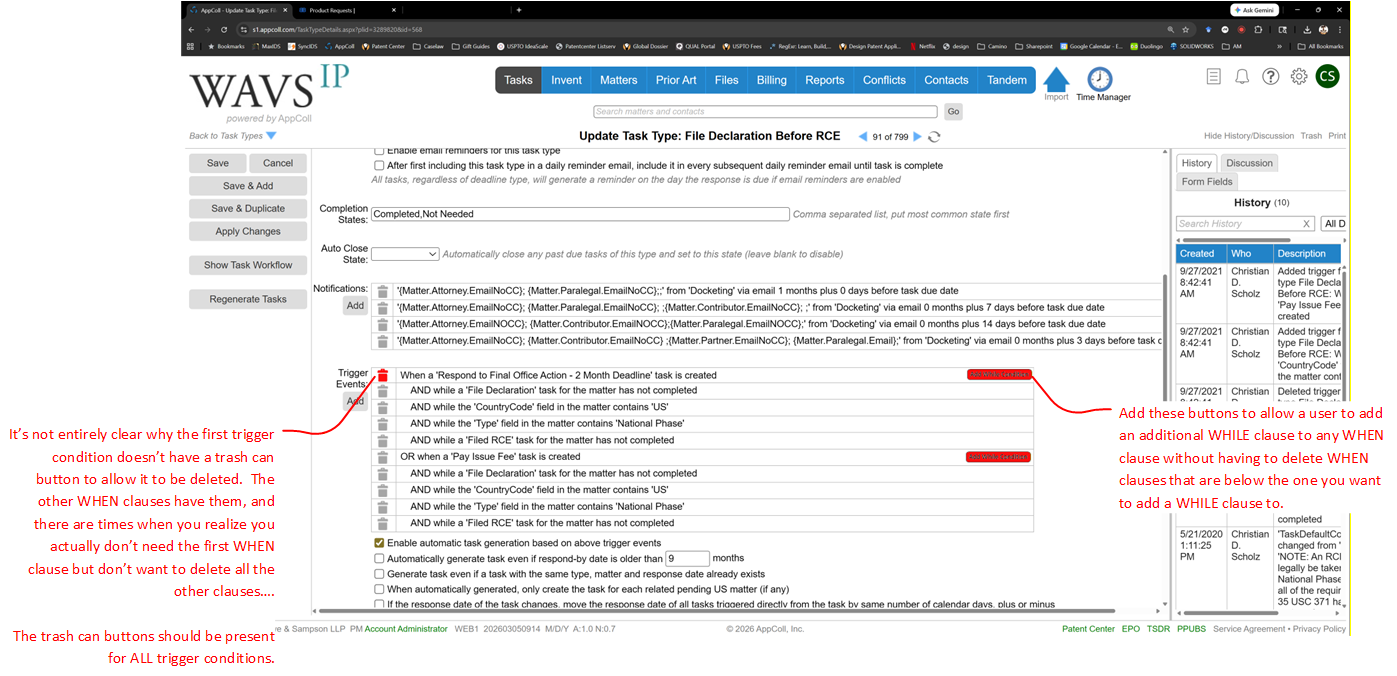
      Trigger condition editing for Tasks in AppColl is in dramatic need of improvement--there is no ability to insert new triggers in between existing triggers, or to change which "when" clause a given "while" condition is "anded" with.

      This makes defining new tasks or modifying existing ones extremely tedious. For example, if you have a task with multiple different trigger scenarios, each with its own WHEN clause that each have their own WHILE clauses, you might easily have 10-12 separate trigger conditions, e.g., 3 WHEN clauses, each with its own set of 3 WHILE clauses. If you realize that you need to tweak the triggering by adding another WHILE clause to the last WHEN clause, no big deal--just tack it on and you're done. But if you need to do it to the first-listed WHEN clause, you're out of luck--you have to delete the second and third WHEN clauses and all their WHILE clauses, add the new WHILE clause to the first WHEN clause, and then re-construct the second and third WHEN clauses and all their WHILE clauses. In the example above, you'd have to delete 8 of your 12 trigger clauses, add the additional trigger clause, and then re-build the deleted clauses.

      Suggestion: The trigger conditions for a TaskType are currently listed in a table format, with the WHILE conditions indented in rows below their parent WHEN condition. Just add a button to each WHEN condition row in the table that would, when the user clicks it, allow the user to insert a new WHILE condition for that WHEN condition. The newly added WHILE clause would be added after the existing WHILE clauses for the relevant WHEN clause. This would entirely solve the significant usability issue noted above.

      Icing on the Cake Suggestions: Maybe also add up/down buttons to allow the order of trigger conditions to be changed. This would be more of a cosmetic change, as changing the order of WHILE clauses within a WHEN clause would have no functional impact--but it would allow users to re-organize the WHILE conditions within a WHEN condition so that they are more consistent between WHEN conditions for a given TaskType. And it would allow a WHILE condition to be moved up or down into an adjacent WHEN condition, which would affect function but also potentially be useful if you put a WHILE condition in the wrong WHEN condition and want to relocate it.

      Finally, the UI already has the ability to individually delete any condition--except the first WHEN condition. It really should allow the user to delete that one as well. There are times when you define a set of task triggers to have multiple WHEN conditions, and then later you realize that the first one isn't needed any more. But you can't delete it without deleting all trigger events and then rebuilding the ones you want to keep. Or by changing the first WHEN condition to be the last WHEN condition and updating its WHILE conditions to match (only works if first WHEN has same or greater number of WHILE conditions as last WHEN condition or if you only have two WHEN conditions).

      Screenshot below showing suggested revisions to TastType definition UI.

      Trigger UI.png

      posted in Product Requests
      ChristianS2558
      ChristianS2558
    • AppColl account syncing - better Connections syncing

      Right now, if you Sync Connections from one account to the other, the existing Connections are overwritten in the recipient account. Clients are usually the ones requesting and receiving syncs from their OC; this causes issues since clients are usually also using Invention Manager, which creates IDF records that are then "connected" to the eventual application(s) that they spawn. OC, however, don't usually have Invention Manager and don't have records of their clients' IDFs. As a result, OC's connection data doesn't have the IDF linkages.

      This presents a problem when OC syncs connection data to a client, as the current sync causes a wholesale replacement of the client's connection data (for all connections) to be overwritten with the OC connection data. Thus, connections that the client has between IDFs and applications will get overwritten and lost.

      It would be a nice if AppColl could be set up so that users that receive syncs could specify what level of syncing should be performed on connections, e.g.:

      • Sync priority connections (y/n)?
      • Sync subject matter connections (y/n)?
      • Sync IDF connections (y/n)?

      AppColl would then only sync connections that match the connection types selected. For example, if an account owner specified "y" for priority connections only, then AppColl would, when syncing, only remove and replace connections that are "priority" connections. It would leave any "subject matter" or IDF connections alone.

      Since we are not Invention Manager users, I don't know if IDFs have a separate connection type--if they are also "subject matter" connections, it might be nice to allow users to treat them differently from other non-IDF subject matter connections, so I broke them out as a separate category above.

      Is this something that could be implemented?

      Without it, it makes the Sync feature for connections data pretty much unusable.

      Best,
      Christian

      posted in Product Requests
      ChristianS2558
      ChristianS2558
    • RE: Admin-modifiable UI

      @jonah-soundhound-com Yeah, I thought of that as well--but at some point, too much customizability becomes problematic for AppColl since it makes it difficult for them to write coherent instructions for users (if you have a screen shot showing where fields are but users may have completely different UI layouts, that may introduce headaches).

      However, one way to maybe address that is to have a button/toggle in the UI that lets users instantly flip between a "default" AppColl UI layout (like it is now) and a customer-defined layout (in which admins could reposition any fields to suit the needs of their attorneys/admins). That way AppColl's help files are still applicable to the AppColl default, but users can also use custom layouts--with the understanding that AppColl help files are intended to be directed at the default layout....

      posted in Product Requests
      ChristianS2558
      ChristianS2558
    • RE: Larger form letter template size to be sent from local email client

      @MikeO5888 Actually, there is a workaround....

      The 2K limit is, it is true, a browser-inherent limit. But not all browsers are created equal....

      Chrome and Edge, for example, seem to have limits of around 2K for MailTo link text.

      However, Firefox seems to have a massive larger limit. For example, I have been able to successfully generate emails from AppColl in Outlook using Firefox that have nearly 24,000 characters (5+ pages of solid text in Word).

      Keep in mind that if Firefox ever reduces that limit, there is nothing AppColl can do about it. At the same time, Chrome and Edge might raise it, allowing them to be used in a similar manner....

      So if you're willing to use Firefox as your AppColl browser, you should be able to have much more flexibility in terms of the size of the email template for direct creation in your Outlook client.

      Cheers,
      Christian

      posted in Product Requests
      ChristianS2558
      ChristianS2558
    • RE: Attorney Matters button

      @jonah-soundhound-com Would it work to just have a "matters" button in the Contact details interface that will list all matters where that contact is listed in any capacity? Or is there a reason to have different buttons for different roles that they can be in for each matter?

      posted in Product Requests
      ChristianS2558
      ChristianS2558
    • RE: Track One Application Deadlines - no extensions

      @AnnM9156 That is correct--it is just a field that records data regarding the application. You can, however, customize triggering for tasks based on the value in that field. I took a look at our docket, and our 3-month non-final OA response deadline has two flavors--one that is called "Respond to Non-Final Office Action - 3-month deadline" and the other that is called "Respond to Non-Final Office Action - 3-month deadline (Track One)." The "track one" version triggers when a non-final OA is received in a case that has Track One status specified, and the non-track one version triggers when a non-final OA is received in a case that does not have Track One status specified. Our 4-month OA deadline triggers when either of the 3-month deadlines closes as "missed."

      posted in Product Requests
      ChristianS2558
      ChristianS2558
    • RE: Pop-Up (Flagged) Notes

      The transient task solution wouldn't really do much--just email the recipients once when the note is updated. Fast forward a month later, and nobody will remember that they received that email, and might miss whatever is important.

      Your pop-up slap-to-the-face approach would be much more effective at getting a user's attention.

      posted in Product Requests
      ChristianS2558
      ChristianS2558
    • RE: Syntax for alternate field, when a first field is blank

      Or maybe AppColl could just introduce a new FormField called "FirstNickname" that used the Nickname if present and the First if not.

      Although your approach would be more flexible in case similar substitutions are needed in other cases.

      posted in Product Requests
      ChristianS2558
      ChristianS2558
    • RE: Syntax for alternate field, when a first field is blank

      Just upvoted your original idea, Sadiq.

      posted in Product Requests
      ChristianS2558
      ChristianS2558
    • 1
    • 2
    • 3
    • 2 / 3