@BrandonK6644 The following query should work for your first question. Please let us know if you have questions.
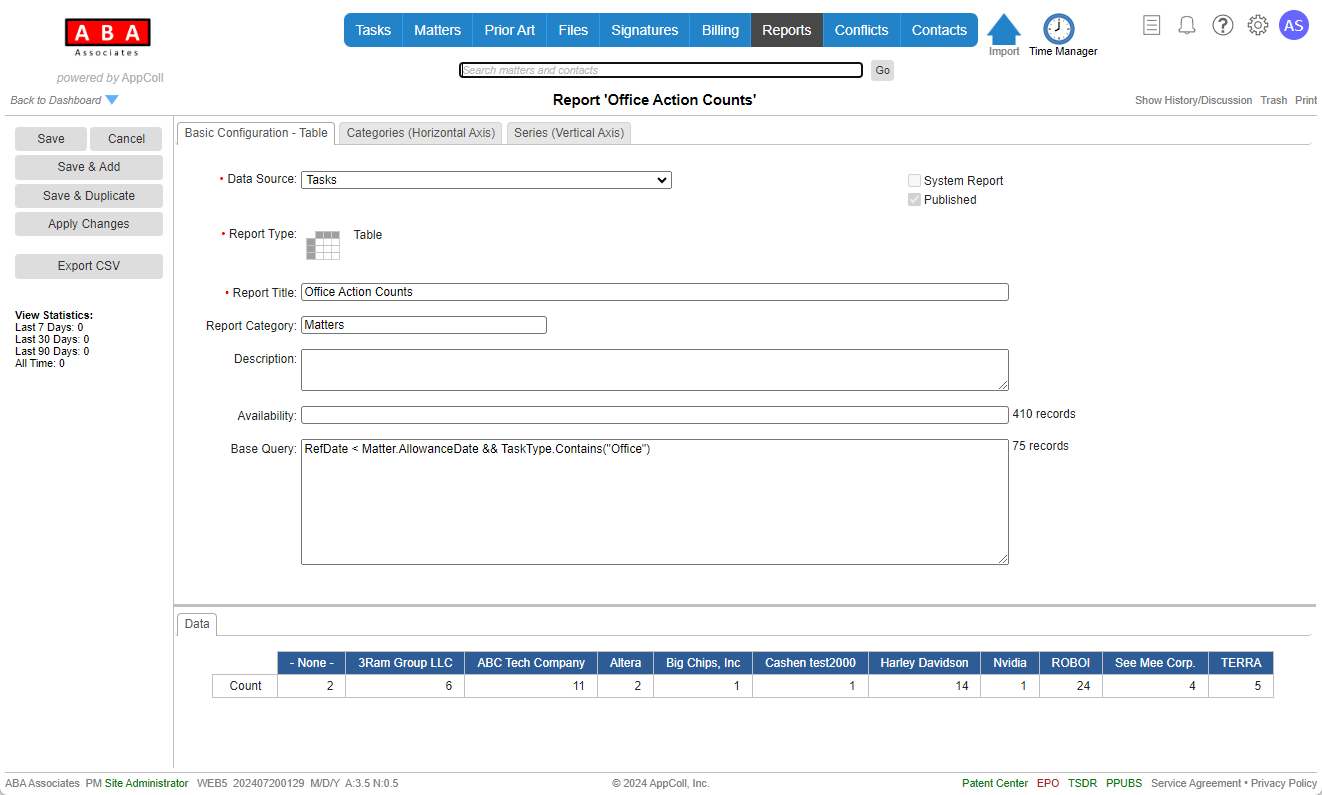

@BrandonK6644 The following query should work for your first question. Please let us know if you have questions.
We will certainly get this added Christian. Thanks for letting us know.
We might be able to do this if you're using AppColl to send the email. We will pass this onto engineering. Unfortunately, it would not be possible to do so if you're using Outlook/Gmail due to browser restrictions on the amount of data that can be sent to another email program.
Hi Kim,
Thank you for the suggestion. We will pass your suggestion on to engineering for future consideration. Please keep the ideas coming.
Hi Nicole,
The following should help.
https://support.appcoll.com/prior-art/cross-cite-prior-art-references
Specifically the section titled" Copy selected references from one matter to another"
Please let us know if this works.
@BrandonK6644 Thank you for the suggestion. We will pass this on to our engineering group for future consideration.
@BrandonK6644 The first report maybe possible, we're looking into this and will get back to you.
The second report is possible provided you have created a custom "File RCE" task type and close them as they are filed. Do you currently have this set up? Thanks.
@BrandonK6644 Thank you for the suggestion. We will certainly pass this on to engineering for future consideration. Keep the ideas coming.
You should be able to sync tasks without issue. When you look into the Sync settings, there will be an option to enable these, along with the ability to choose which fields you wish to copy over.
Also, you should be able to sync email notes as of Friday. Please let us know if you need further assistance.
Hi Amy - Each time a document is saved (with the same name) a revision is created. Since we do not provide for editing a document within AppColl, the document must be edited on your local PC/Mac and then uploaded back into AppColl. This will create a new revision. Under this scenario, users would never be editing the same document.
We hope this helps.
Hi George,
Thanks for the feedback. Adding the ability to calculate foreign exchange rates is a great idea. We will pass this on to engineering for their consideration.
@ChristianS9906
Thanks for the feedback. We are working on some updates and we'll take your suggestions under consideration. Keep the ideas coming.
Hi Richard - setting up periodic reports is the way to go for exporting data. This can be sent to your SFTP server, S3 buckets or traditional email.
You can also send data to our SFTP server, which we can upload into your account. You would need to reach out if this route is something you're considering.
We hope this helps.
This is great information. Adding multiple signatures per document is our highest priority for Signatures. We will let you know when this has been added.
@GeorgeJ4336 Hi George. Thank you for the feedback. How do you currently handle? Do you have inventor 1 sign and PDF back to you. Then have inventor 2 sign the same document inventor 1 signed and then PDF back the same document. And then on to the next, etc.?
@ChristianS9906 Thank you for the suggestion. We have passed this onto engineering for future consideration and will let you know if we have a plan for this. Thank you and keep the suggestions coming.
Hi Christian and Sadiq - we understand what you're asking and will pass this on to engineering.
@GeorgeJ4336 thank you for the suggestion. We will certainly pass this on the engineering.
Hi Sadiq - do you have an example matter we can take a look at?
Thanks.
Hi Alexandre,
We can send your data periodically to your server, via scheduled reports. Unfortunately, we do not have plans to introduce an API for security reasons.
Thanks.
Hi Christian,
This is a good idea. We've passed it onto engineering for a future update.
@AlexandreP4784 Thank you for the input. We will pass this on to engineering for their consideration.
@AlexandreP4784 While this is not a standard status, we can certainly add it to your account. Please send an email to support@appcoll.com for this request.
@KozueL5421 We are working on fully integrating with EspaceNet which will speed things up and populate the requisite data. This is likely to happen by end of week. We hope this helps.
@BrandonK6644 Thanks for the input, we will pass this on to our engineering group for future consideration.
@MelissaT3398 Currently we don't have a way to show a created date field that allows for showing a table of contacts and their dates. The only way to do with would be through the transaction history. Search for "added contact" and the name and look at the transaction date.
Currently, we do not have a way to do this. However, we have passed this on to engineering for future consideration.
@KimG5166 this is on our list of future projects. We will make an announcement when this has been added. We hope this helps.
@ChristianS9906 you would get this by clicking on the "Empty Trash" button. Thanks.
Hi Melissa - this is a good idea and something we will pass on to engineering. Keep the ideas coming.